
Reading Iqbal and Nazir Ahmad online, the way an Urdu book should read
Nine Urdu classics, out of copyright, now in the Desk&Wifi members' library as e-books set in Nastaliq that turn right to left.
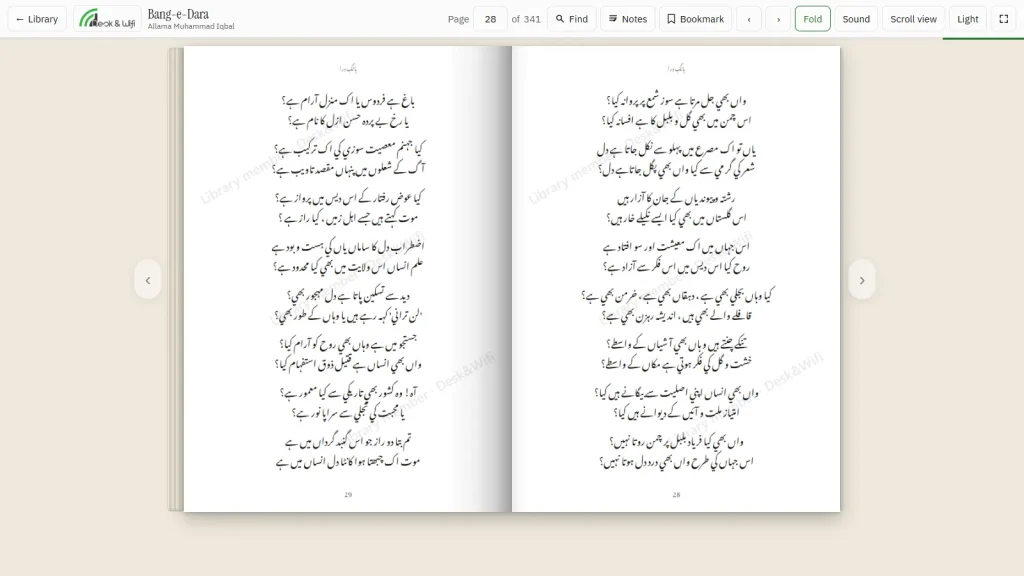
Most Urdu e-books you find online are scans: photographs of pages, slow to load, impossible to search and blurry on a phone. Or they are text files that throw away the one thing that makes an Urdu book feel like an Urdu book, the Nastaliq script and a book that opens from the right.
We wanted our members to be able to read the Urdu classics properly, so the Desk&Wifi library now has nine of them as e-books, read in the browser, set in Nastaliq, with pages that turn right to left like the printed book.
What is on the shelf
Allama Iqbal. Bang-e-Dra (1924), his first collection of Urdu poetry; Bal-e-Jibril (1935); and Zarb-e-Kalim (1936).
Deputy Nazir Ahmad. All five of his novels: Mirat-ul-Uroos, often called the first Urdu novel, Banat-un-Nash, Taubat-un-Nasuh, Fasana-e-Mubtala and Ibn-ul-Waqt. Each has its own page in the catalogue.
Patras Bukhari. Patras ke Mazameen, the essays that a lot of us first met in a school textbook and are funnier than we remembered.
All nine are out of copyright. Under Pakistan’s copyright law a book belongs to everyone fifty years after its author dies, and all three writers died long before that line: Nazir Ahmad in 1912, Iqbal in 1938, Patras Bukhari in 1958. That is why we can put them online and say so out loud.
How the reader works
It opens in the browser, on a phone or a laptop, at the space or at home. There is nothing to install and nothing to download.
- Right to left. The book opens from the right and the pages turn the way an Urdu book turns. On a phone you can switch to a single scrolling column instead.
- It remembers your place. Close the tab and the book opens where you stopped. Put the ribbon in on purpose and it opens there instead.
- Highlights and notes. Select a line to highlight it in one of five colours or write a note beside it. Your notes are private to your account, and you can copy them all out at the end.
- Quote a verse. Copy a few lines to send on WhatsApp and the book’s name and the poet come with them.
- Find. Search inside the book, jump to a chapter, and make the page warmer or dimmer for reading at night.
The texts were set from digital editions rather than photographed, which is what makes them sharp and searchable. If you find a mistake in a line, tell the desk and we will correct it.
The rest of the library
The Urdu classics sit alongside the rest of the members’ library: printed books on the shelf in Hall 2 to borrow for fourteen days, more e-books in English, and audio books you can listen to with the screen off. The whole catalogue is open to browse; reading, borrowing and listening come with every plan.
If there is a book you would like to see on the shelf, in Urdu or English, ask at the desk or use the request form on the library page once you are signed in.